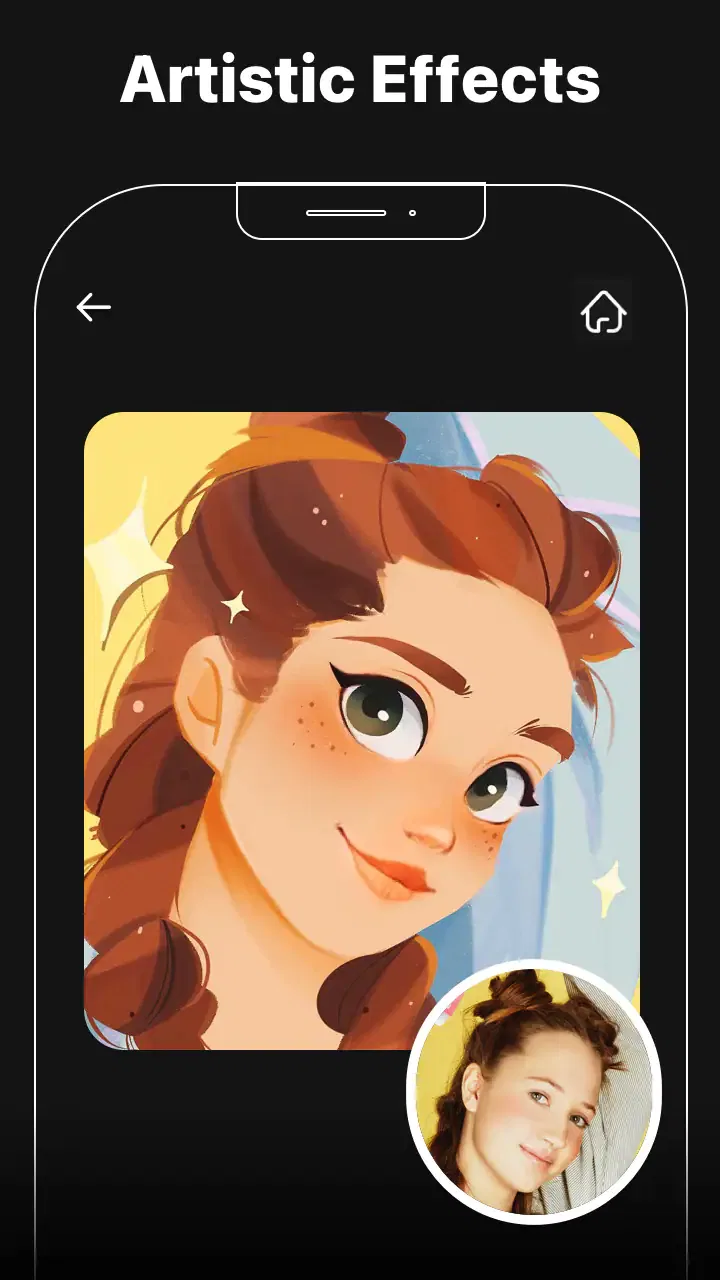
Cartoon Photo Editor: Facee
- 4.1
- Rating
- 1.00M
- Installs
- Free
- Price

 Analysis by App-foxy
Cartoon Photo Editor: Facee caught my attention for a simple reason: it turns an ordinary picture into something much more stylized without asking me to learn a complicated editing program. During the first few sessions, I found the appeal immediate. I could start with a portrait, try a cartoon treatment, compare a few looks, and save the version that felt most fun. That quick path is the app’s strongest quality, especially when I want a playful profile image or a quick post rather than a carefully retouched photograph.
After spending more time with it, though, my opinion became more measured. The novelty is strong in the first week, but lasting value depends on whether you regularly use cartoon and anime-inspired edits. This is a focused app in the video players and editors space, developed by Palette Cartoon Photo Editor APP, and its purpose is clear: give photos a 3D cartoon feel and cute illustrated styling. It is not trying to replace a complete photo editor, and I think it works best when treated as a specialist tool rather than an everyday image-management app.
From instant novelty to a repeatable editing habit
I find that an editing app becomes a habit only when it fits the way I already choose and use photos. Here I look at what makes a quick cartoon portrait worth repeating, and how a small amount of intention can turn one-off experimentation into a useful personal routine.
You May Also Like

 Blood Strike: 2.5 Anniversary
Blood Strike’s Loadouts Turn Every Drop Into a Tactical Gamble
A close look at Blood Strike’s custom loadouts: how fast access to signature weapons reshapes its battle royale rhythm, rewards preparation, and narrows the gap between fights.

 Pandora - Music & Podcasts
Pandora’s Music Is Easy to Start, but Harder to Recover
Pandora’s strength is its low-effort path from a seed to a station. Its weak spot is how much confidence it asks you to place in connection, setup, and quiet recovery.

 8 Ball Pool
 Is Built on Rivalries, Rematches, and Routine
A close look at the rivalries, rematches, shared routines, and unanswered safety questions that turn a quick pool match into a persistent mobile community.

 Samsung Music
’s Quiet Strength Is Playing What You Already Own
Its reach comes less from spectacle than from dependable access to a personal library. That simplicity is both the app’s strongest retention engine and its ceiling.

 AccuWeather: Weather Radar
AccuWeather Review: A Quick, Clear Forecast for Everyday Decisions
For everyday plans, the best forecast is the one you can understand quickly. AccuWeather makes rain timing, radar, and local conditions easy to act on, with a few trade-offs.

 Hill Climb Racing
Why Hill Climb Racing Still Turns Crashes Into One More Run
A tiny car, a bumpy hill and one more upgrade: Hill Climb Racing keeps resurfacing because its simple chaos makes every near-miss feel personal.
More From Our News Desk



Why the first week feels so satisfying
The first-week experience is built around experimentation. A familiar face looks different after each filter, and that transformation creates the kind of instant feedback that makes me want to test one more option. I do not need to understand layers, masks, curves, or manual color correction before seeing a result. For someone who usually gives up on editing apps because they feel technical, that accessibility matters.
I also like the distinction between using this app for a finished portrait and using it as a visual sketchbook. A photo that feels ordinary in the camera roll can become a possible avatar, a playful message image, or a starting point for a themed post. The cartoon treatment changes the mood more dramatically than a normal brightness or contrast adjustment, so the app offers a noticeable result instead of a barely visible improvement.
A realistic example is a weekend group photo. If I want to send something amusing to friends, I can choose a clear face-focused image, apply a cartoon style, and share the edited version instead of spending time making every person look conventionally polished. That is where Facee feels more useful than a standard enhancement tool: the goal is expression and personality, not photographic accuracy.
The app is free to install and is rated for Everyone, which makes it approachable for casual users and families looking for harmless creative editing. It has passed the early-discovery stage with over a million installs and an average rating of 4.1, so there is clearly an audience for this kind of quick transformation. I would still judge it by personal workflow rather than popularity, because cartoon effects are naturally more appealing to some people than others.
What I would prepare before editing
The source image matters more than I expected. A well-lit portrait with a reasonably clear face usually gives the style more to work with than a dark, distant, or heavily obstructed photo. This is not a criticism unique to Facee; stylized filters need recognizable visual information. Still, it means the app cannot rescue every weak picture. If I choose the first image in my camera roll without checking it, the result may feel less convincing and I may wrongly blame the filter.
My practical approach is to make a small selection first. I look for one close portrait, one image with a different expression, and one photo with a simple background. Comparing those three tells me quickly whether the app suits the kind of pictures I normally take. It also prevents me from wasting time repeatedly processing images that were never good candidates for a face-centered effect.
Another useful habit is to keep the original untouched. Cartoon edits are intentionally strong, and the same image may later be more useful in its natural form. I prefer treating the stylized version as a separate creative copy rather than as a replacement. That small bit of organization becomes important if I use the app for profile images, invitations, messages, or social posts over several weeks.
Where it fits beside familiar alternatives
Compared with a conventional photo editor, Facee is faster for a single visual idea but less flexible for detailed correction. A traditional editor is better when I need precise cropping, selective adjustments, text placement, blemish work, or control over the final color. Facee makes more sense when the main question is, “What would this portrait look like as a cartoon?” rather than, “How do I perfect every part of this photograph?”
It also differs from broad social-media editing suites. Those apps often combine filters with collages, templates, captions, retouching, and publishing tools. Facee’s narrower focus can feel refreshing because I am not navigating a large toolbox to reach one effect. The trade-off is that I may need another app afterward if I want to add a layout, write a caption directly onto the image, or prepare a polished multi-photo post.
Against manual illustration or avatar creation, the advantage is speed. I can begin with a real photograph instead of drawing facial details from scratch. The disadvantage is creative control: a preset interpretation may not match the exact character or mood I imagined. For a quick personal image, that compromise is reasonable. For a commissioned design or a carefully branded profile, I would choose a tool with more deliberate control.
What remains useful after the first month
The first burst of novelty is only part of the value; familiar tools can still earn a place when they serve specific occasions. I consider how I would keep the results selective and practical over time, including when a cartoon treatment adds character and when leaving a photo alone is the better choice.
Recurring value depends on occasions
After the initial excitement fades, I do not open this kind of app every day. That is not necessarily a failure. Its recurring value comes from occasions: changing a profile picture, preparing a birthday message, making a playful image for a group chat, or giving a travel photo a different personality. If I have a steady stream of portraits and enjoy rotating visual styles, it can remain useful. If I rarely edit faces, it will probably become a novelty that sits unused.
I find the strongest long-term use in small personal projects. For example, I could create a set of cartoon versions for a private event, use a consistent style for several family images, or keep a few alternatives ready for different social profiles. The key is consistency. Randomly applying a different look to every photo can feel entertaining at first but visually messy later. Choosing a small theme and reusing it makes the app feel more purposeful.
One non-obvious trade-off is that a dramatic effect can be excellent for a single image but tiring across a series. I would not automatically process an entire album. Instead, I would select the strongest portraits and leave the rest natural. This selective workflow saves time and produces a better balance between novelty and recognizability.
How I would use it month to month
My suggested routine is simple: keep the original photo, test a small number of suitable portraits, compare the results at normal size, and save only the versions I would genuinely use. Looking at an effect full-screen can make it feel impressive, but a profile image or messaging thumbnail may display much smaller. A style that looks attractive in the editor can become too busy when reduced, so checking the likely destination is a valuable final step.
For a profile picture, I would favor a clear face and a restrained background. For a fun message, I can accept a more exaggerated treatment because the purpose is emotional rather than professional. For a public-facing account, I would be more selective and consider whether the cartoon version still resembles me enough for people to recognize it. That distinction prevents the app from being judged by one standard for every situation.
The developer, Palette Cartoon Photo Editor APP, keeps the product positioned around this specific creative use rather than presenting it as a complete editing workstation. The current version is 2.2.0 and requires Android 6.0 or later, so compatibility is worth checking before building a routine around it. For supported devices, the low entry barrier is helpful; for older hardware, I would pay attention to how comfortably image processing fits into my normal workflow.
When payment changes the calculation
Because the app is free, I can evaluate the core experience before spending anything. That is important here: the real question is not whether the first effect is amusing, but whether I will return often enough to justify optional purchases. In-app items range from $0.99 to $31.99 each, so I would avoid buying impulsively during the first burst of excitement.
My advice is to use the free experience across several different occasions first. If I still want the same style after editing a profile image, a group picture, and a casual social post, a small purchase may feel more reasonable. If I only opened the app once to see a cartoon version of myself, paying for a larger package would not make sense. The upper end of the purchase range is especially difficult to justify for someone who only needs occasional amusement.
I would also think about repetition before paying. A collection of similar effects may look generous at first but offer little extra value if I always choose one familiar style. The better purchase, if available for the workflow I want, would be the one that adds genuinely different creative directions rather than minor variations that produce nearly identical results. That is a general buying principle, but it matters particularly for a focused filter app where use can become repetitive.
Maintenance, friction, and the point where the fun wears thin
A focused editor can stay easy to return to, but repeated experiments and purchase decisions still deserve a little care. I look at the everyday sources of friction that can build up, and at the point where I would stop trying new effects and choose a broader tool instead.
The maintenance burden is low, but not zero
Facee does not require the kind of ongoing organization associated with a full editing project. I do not need to maintain timelines, catalogs, or complex presets just to create a single cartoon portrait. That simplicity is a lasting advantage. I can return after a few weeks without having forgotten a complicated process.
The maintenance burden shifts to my camera roll. Repeated experiments can create several versions of the same face, and saving everything quickly makes the results harder to find. I prefer keeping one or two final edits and deleting obvious tests. If I am preparing images for a particular event, I would create a dedicated album before starting. This is a small workflow improvement, but it keeps a lightweight app from producing unnecessary clutter.
I would also avoid using it as the only place where important images exist. The original should remain available, and finished edits should be stored in the normal location I already trust. That makes it easier to reuse a picture in another app, compare the natural and stylized versions, or change direction later. The best maintenance strategy is not elaborate; it is simply keeping the creative copy separate from the source.
Where fatigue begins
The biggest source of fatigue is sameness. Once I have seen a few cartoon interpretations of similar portraits, the surprise naturally weakens. Even attractive filters can start to feel interchangeable if I use them without a clear purpose. This is why I would not recommend Facee to someone searching for a complete daily editing system. The focused concept is its strength, but that same focus limits how long it can feel fresh.
Another point of fatigue is the gap between a striking preview and a useful final image. A highly stylized face may look entertaining on its own but clash with the rest of a profile, album, or professional identity. The more often I use the app, the more I need to ask whether the result serves a purpose. Without that check, I am collecting effects rather than making images I actually want to keep.
There is also a practical limit to what I expect from automated styling. If I want a very specific expression, controlled proportions, exact colors, or a consistent character design across many images, a preset-based cartoon editor may not be enough. I would move to a more advanced editor or illustration workflow in those cases. Facee is strongest when I welcome its interpretation; it is weaker when I need the image to obey a detailed brief.
Who should make room for it
I think the app is a good fit for people who want quick portrait transformations, enjoy anime or cartoon aesthetics, and prefer trying a visual idea without learning professional editing tools. It can also suit someone who needs an occasional profile image or wants a lighthearted way to personalize pictures for friends. The free starting point makes experimentation easier, while the Everyone rating keeps the intended audience broad.
I would skip it if my priority is natural retouching, precise design control, video editing, or a complete social-content workflow. Despite sitting in the broader video players and editors category, its appeal is specifically image stylization. Someone seeking color grading, detailed restoration, typography, collages, or professional asset preparation will likely be happier with a broader alternative.
I would also skip it if I dislike exaggerated results. Cartoon effects are not subtle corrections, and the transformation may be exactly what one person loves and another person finds unflattering. The safest approach is to treat the app as a creative option, not as a universal improvement button.
My long-term verdict on keeping it installed
My final view is that Cartoon Photo Editor: Facee earns lasting space for the right kind of user, but not because it replaces every other editor. It earns that space by making a specific task quick and approachable. When I want a playful portrait, an unusual profile image, or a quick visual surprise for friends, the focused workflow is more convenient than opening a large editing suite.
Its long-term value is strongest when I use it selectively. I would keep the original photos, choose images carefully, check how the result looks at its final display size, and avoid buying extras until the app has proved useful across several occasions. Those habits reduce clutter, limit purchase regret, and help the cartoon treatment remain special instead of becoming visual noise.
The limitations are equally clear. The novelty can fade, repeated effects may feel similar, and the app does not offer the same control as a full photo editor or illustration tool. Its current version, 2.2.0, gives supported Android users a straightforward way to explore the concept, but compatibility and personal editing needs still matter more than the version label. I would not install it expecting a complete creative studio.
For me, the deciding question is simple: do I regularly want my photos to look illustrated? If the answer is yes, this free app is easy to recommend as a handy specialist. If the answer is no, the first-week amusement may not justify keeping it around. Its best quality is not endless novelty, but reliable access to a quick cartoon transformation when a normal photo feels too ordinary.
FAQs for Cartoon Photo Editor: Facee
01What is Cartoon Photo Editor: Facee?
Cartoon Photo Editor: Facee is a photo-editing app designed to transform ordinary portraits and selfies into cartoon-style images. It typically offers artistic filters, illustrated effects, face-focused adjustments, and creative overlays that can give photos a comic, sketch, or animated appearance. The app is mainly intended for casual editing, social media posts, profile pictures, and experimenting with different visual styles.
02How do I use Cartoon Photo Editor: Facee to edit a photo?
After opening Cartoon Photo Editor: Facee, you can usually select an image from your device’s gallery or take a new picture with the camera. Choose a cartoon or artistic effect, then preview the result and adjust any available settings such as intensity, brightness, contrast, or color. Once satisfied, save the edited image to your phone or share it directly through compatible social and messaging applications.
03Is Cartoon Photo Editor: Facee free to download and use?
The application may be available to download at no initial cost, but free access can include advertisements, limited effects, or restrictions on certain editing tools. Some features may require in-app purchases or a subscription, depending on the version and platform. Before confirming any payment, users should review the pricing, trial conditions, renewal terms, and whether exported images include branding or other limitations.
04Does Cartoon Photo Editor: Facee require an internet connection?
Basic editing may work without a continuous internet connection if the necessary effects and tools are already included in the app. However, an internet connection may be needed to download additional filters, display advertisements, process certain cloud-based effects, or access updated content. Availability can vary by device and app version, so it is best to test the main editing functions offline before relying on the app while traveling.
05Is Cartoon Photo Editor: Facee safe for editing and sharing personal photos?
Users should review the app’s privacy policy and requested permissions before importing personal images. Pay attention to whether the app requests access only to selected photos or to the entire media library, and check whether images are processed locally or uploaded to external servers. Avoid sharing sensitive photographs, and download the application from an official store to reduce the risk of modified or unsafe versions.
Pros
- Transforms selfies into cartoon-style portraits in just a few taps.
- Offers a fun way to create distinctive profile pictures and social posts.
- Simple editing controls make it accessible for beginners.
- Useful filters can refresh older photos without advanced editing skills.
- Quick results are convenient for casual
- creative photo projects.
Cons
- Some effects may look overly artificial on detailed or low-quality photos.
- The best filters and tools may require in-app purchases.
- Advertisements can interrupt the editing experience.
- Results may vary depending on lighting
- facial angles
- and image quality.
- Privacy details should be checked before uploading personal photos.

Cartoon Photo Editor: Facee
Gallery